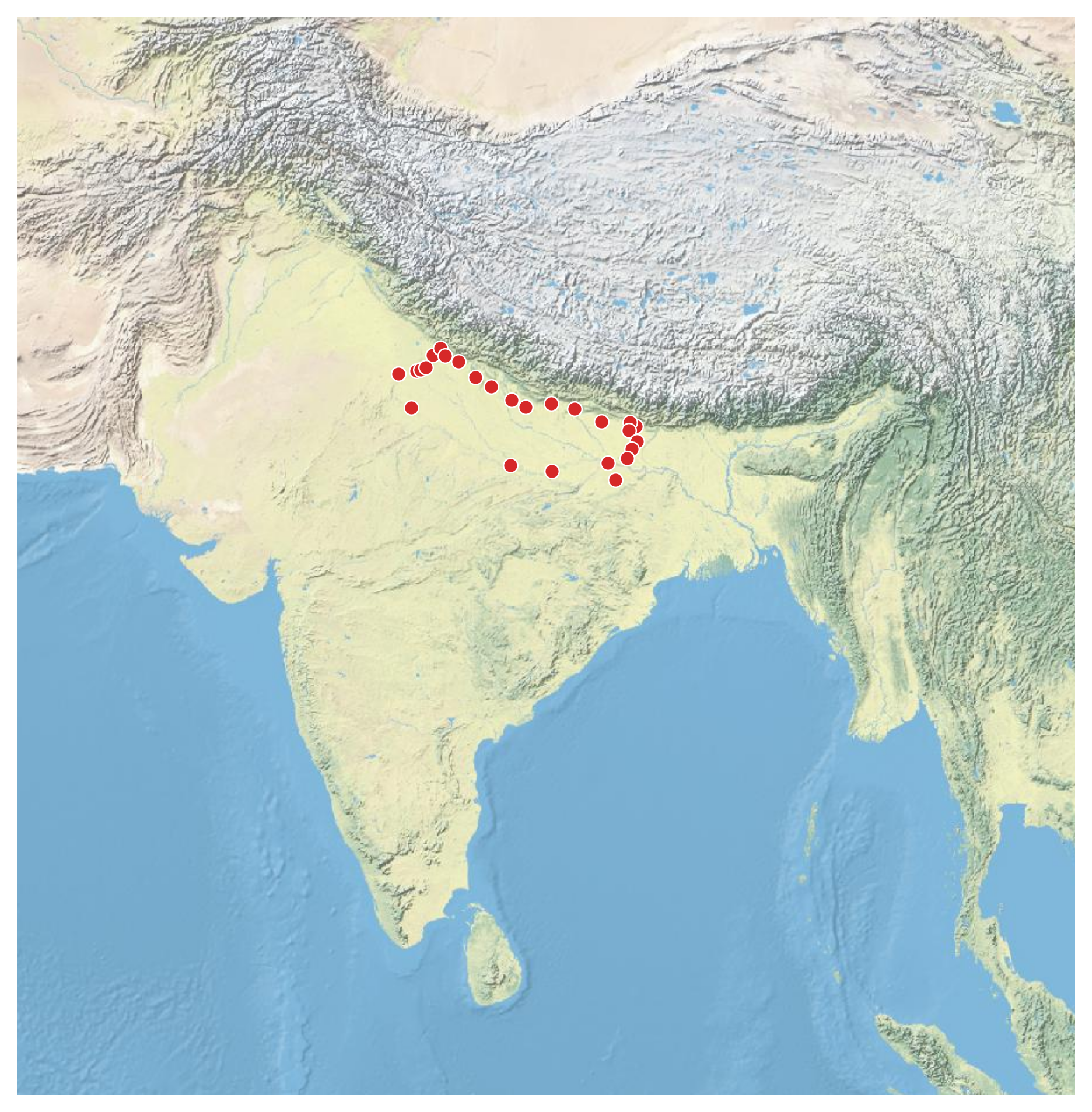
Route map: Jarasandh killing
This route map is generated from data returned by /mb/v2/journeys/{name} endpoint, with full details (?expand=true) where {name} = Jarasandh killing.
To see a larger image, click the image.
On this page
- What this map shows
- What to explore next
- Endpoint to use for this map
- Cartographic libraries
- Algorithm
What this map shows
At first glance, what stands out immediately is the circular route:
- The onward journey is through a northern, lesser travelled route bordering on the Himalayan terai region.
- The return journey is through a straight route on the Gangetic plains.
From this map, it is evident that the travellers went out of their way to conceal their travel till they reached their destination (Magadh).
What to explore next
- What events preceded and followed this killing? Use the
/eventsseries of endpoints. - What other journeys did the travellers on this route go on? Use the
/journeys/{name}endpoint. - What were the places along this route like? Do they exist today, and if they do, what are their names today? Use the
/places/{name}endpoint. - Were the places along this route frequent pitstops for other journeys too? Use the
/journeys?place={place}endpoint.
Endpoint to use for this map
/mb/v2/journeys/Jarasandh killing returns the following response:
{
  "journeyEvent": "Rajasuya yagya",
  "journeyName": "Jarasandh killing",
  "journeyPersons": [
    "Arjun",
    "Bheem",
    "Krishna"
  ],
  "journeyRoute": [
    "Indraprastha",
    "Kurujangal to Kalakuta",
    "Kalakuta to the east to Mithila",
    "Mithila to Magadh",
    "Girivraj",
    "Girivraj to Indraprastha"
  ]
}
It’s the journeyRoute list that is of interest here. To get detailed route information, use the ?expand=true query parameter.
...
  "journeyRoute": [
    "Indraprastha",
    "Kurujangal to Kalakuta",
    "Kalakuta to the east to Mithila",
    "Mithila to Magadh",
    "Girivraj",
    "Girivraj to Indraprastha"
  ],
  "journeyRouteFull": [null, {
      "pathCurrent": [
        "Hapur (India)",
        "Garhmukteshwar (India)",
        "Gajraula (India)",
        "Dhampur (India)",
        "Kalagarh (India)"
      ],
      "pathNameEpic": "Kurujangal to Kalakuta"
    },
    {
      "pathCurrent": [
        "Kalagarh (India)",
        "Kashipur (India)",
        "Pantnagar (India)",
        "Pilibhit (India)",
        "Lakhimpur Kheri (India)",
        "Bahraich (India)",
        "Shravasti (India)",
        "Kapilvastu (Nepal)",
        "Kudiya (Nepal)",
        "Bagaha (Nepal)",
        "Birganj (Nepal)",
        "Mithila (Nepal)"
      ],
      "pathNameEpic": "Kalakuta to the east to Mithila"
    },
    {
      "pathCurrent": [
        "Mithila (Nepal)",
        "Janakpur (Nepal)",
        "Madhubani (India)",
        "Darbhanga (India)",
        "Samastipur (India)",
        "Patna (India)",
        "Rajgir (India)"
      ],
      "pathNameEpic": "Mithila to Magadh"
    },
    null, {
      "pathCurrent": [
        "Rajgir (India)",
        "Varanasi (India)",
        "Kaushambi (India)",
        "Mathura (India)",
        "New Delhi (India)"
      ],
      "pathNameEpic": "Girivraj to Indraprastha"
    }
  ]
...
Cartographic libraries
The following components were used to generate the map:
- Country boundary dataset from Natural Earth, used for determining the geographic extent of India and surrounding regions
- Geocoding by using Nominatim
- Terrain and physical basemap tiles from Esri (World Physical Map layer)
- Python libraries:
GeoPy, for converting place names to geographic coordinatesShapely, for creating point geometries for the locationsGeoPandas, for handling geospatial data structures and plotting the pointsMatplotlib, for creating the figure and exporting the.pngimageContextily, for adding the terrain basemap tiles
Algorithm
- Geocode the place names (
GeoPy). - Create point geometries from the coordinates (
Shapely). - Store the geometries in a geospatial data frame (
GeoPandas). - Create the figure and axes (
Matplotlib). - Add the terrain basemap tiles (
Contextily). - Plot the locations and export the image (
GeoPandas+Matplotlib).